Showing posts with label ASP.NET MVC. Show all posts

Thursday, July 11, 2013

MVC support for Apps in SharePoint 2013

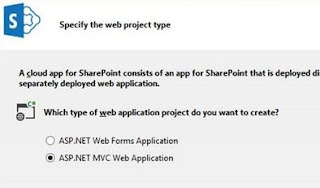
Interesting? Yes, it is the most interesting and surprising news in VS2013 preview release. With Visual Studio 2013 preview now you can create Apps in MVC as well. When you are creating a new APP you can select between ASP.NET web forms and ASP.NET MVC.

These options can be available when you choose Auto-Hosted or Provider-Hosted app for SharePoint. We all know the SharePoint-hosted apps won't allow server side programming. :) When you created an app using ASP.NET MVC model then you see the same folders and structure as in mvc web site. Complete model is same as regular MVC implementation. The new things for you might be are the SharePoint filter and context files. The project provides a set of APIs, defined in the Filters\SharePointContextFilterAttribute.cs and Filters\SharePointContextFilterAttribute.vb, and SharePointContext.cs and SharePointContext.vb files for C# and Visual Basic projects respectively...
SharePointContextFilter: Filters can be useful for switching back and forth between SharePoint and remote web application. Mostly when the SharePoint site need authentication etc.

SharePointContext: This is for communicating the App with SharePoint objects.

To test the new implementation you should download the VS 2013 preview now and start doing the innovation things. :) Enjoy the new learning day to day. 

Saturday, June 23, 2012

Mapping and metadata information could not be found for EntityType

When I am working with MVC, using Entity Framework this is the error which I get when I do some database changes and forgot to reflect the changes in edmx file or the objects. The detailed error is

"Mapping and metadata information could not be found for EntityType Error"

So, the possibilities are:
  • Database table columns changed but those changes not reflected in C# object properties. There could be properties missing, misspelled or the mismatching of the data types.
So make sure you sync Database and your Project classes always to avoid the above errors.

Tuesday, October 27, 2009

How to drag and drop entities from server explorer to EDMX file Entity Framework?

I know for adding the tables/entities to the EDMX file from database, everyone should do this. You will open server explorer, connect to database, expand to tables and select tables you want to add and tried to drag and drop them to EDMX file. But you never succeeded… Am I right? So, Everyone thinks like this by default because we are well used the LINQ files these days. We have the drag and drop support in it. But in Entity framework we don’t have that option as far as I know. Then how to add new database objects to the edmx file? There are two ways one is manual and another is tool.

  • Manual: Open the edmx file in the xml editor to see the code and edit the changes as you needed. Which is complex and won’t yield good results.
  • Tool: We have an option from the diagram file edmx designer to update the model through designer. Which is very simple and we can add/remove objects as we need.

Note: For entity framework there is a special explorer in visual studio 2008 which helps us to see only entity framework related objects which is called "Model Browser". Which is really very simple to use and helps a lot if your DB is big.

image

How to add entities/database objects to EDMX file?

  • Open the EDMX file in design mode.
  • Right click on the designer surface. You have lot of options and among them choose the option "Update Model from Database.." as shown below.
  • image
  • Now, you will see the usual screen which has all the database objects in new window which you have seen while creating EDMX file.
  • image
  • That's it!!! This way you can add/remove/edit database objects in an EDMX file. Usually the drag and drop is the good user experience as it in is in Linq to SQL file. Hope Microsoft include this option in upcoming releases.

I think, you knew about how to add or update db objects in EDMX file now. Love to hear comments.

Unable to update the EntitySet Table because it has a DefiningQuery and no InsertFunction element exists in the ModificationFunctionMapping element to support the current operation

ASP.NET MVC is the technology released from Microsoft long time back. But I didn’t get time to dig into it and research on it. Now, I need to learn it as my next project is in ASP.NET MVC. So, I thought to give a try and want to show all records in a table and insert a new record in a table. On the way, The above is the exception which blocked me to go proceed. I didn’t do any mistake and always the above exception come into picture when I try to create a new record in table.

So, frustrated and started research on the error and debugging. After a long research found the issue in the Entity framework. The whole thing is only because I forgot to add primary key to the table in the database. Once I added the primary key and reconstructed the edmx file with new changes, All works fine and record added to table in database. So, what is happening inside is, entity framework is looking for a key in each and every table [Primary key]. So, don’t forget to add a primary key to each and every table which you want to use in entity framework file [.edmx]. Otherwise you always see this exception when you try to insert or update a record.

"Unable to update the EntitySet 'Table' because it has a DefiningQuery and no <InsertFunction> element exists in the <ModificationFunctionMapping> element to support the current operation."

Is this helpful? Follow me if you want to learn ASP.NET MVC framework. I started learning and will place all my experiences and problems I face in my blog. So, keep an eye on my blog for more updates.